 e-mail button in the image capture window
Nova can send a copy of its map via e-mail. This is useful if you want to
illustrate the configuration of satellites to someone else or to plan for an
upcoming pass. You can also add some explanatory text to accompany the
e-mail.
e-mail button in the image capture window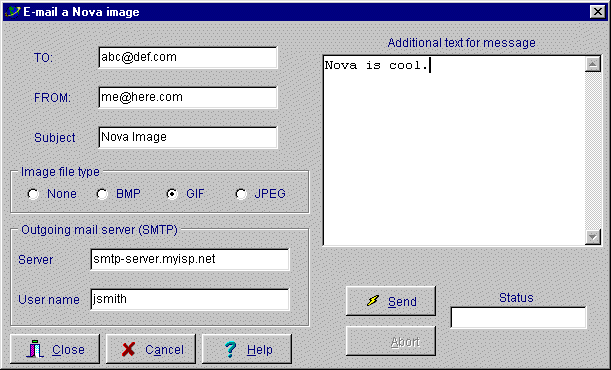
TO: sets the e-mail address of the person who will receive the message
From: is your e-mail address
Subject is whatever you want it to be.
Image file type selects the type of compression, if any, to be used.
None means that no image will be sent. Select this if you want to send plain text instead of a Nova image.
BMP will send a Windows BitMap. It will be 256 colors if that is what your screen is set to, otherwise 24-bit (millions of colors)
GIF and JPEG compress the image to a much smaller size. JPEG is recommended.
Outgoing SMTP server: This is very important and many users have trouble with it. To find the information necessary for these two entries, you can look in your current e-mail program's configuration or contact your Internet Service Provider.
Netscape Navigator : see Edit/Preferences/Mail & Newsgroups/Mail servers.
Microsoft Internet Explorer : look in Tools/Internet Options/Content/My profile
It is a good idea to test your settings by sending e-mail to yourself. Nova retains your entries so you do not have to re-enter them every session.